Best Digital Photo Printing Tips for Vibrant Colors and Lasting Results

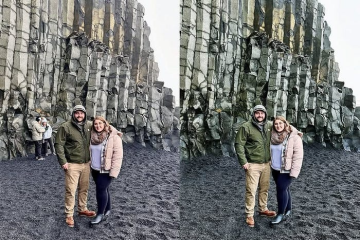
Few creative experiences are quite as deflating as unboxing a freshly delivered batch of photo prints only to find them dark, flat, and muddy. On a back-lit smartphone or desktop display, the image glowed with rich contrast, nuanced shadow detail, and punchy saturation. On physical paper, those delicate highlights have turned gray, the vibrant sunset looks dull, and the deep shadows have congealed into heavy, uniform pools of black.
The disappointment is understandable, but the underlying problem is rarely a defective printer or a flawed camera sensor. It stems from the fundamental physical difference between how human eyes perceive transmitted light from glowing pixels and how they perceive reflected light bouncing off paper fibers. Bringing a digital image into the physical world is an exercise in translation. By mastering display calibration, color management pipelines, substrate selection, and archival chemistry, you can bridge the gap between your screen and the page, producing prints that exhibit breathtaking brilliance and endure for generations.
Calibrating Your Display and Managing Screen Luminance
The single most common reason digital prints turn out unacceptably dark is that the monitor used to edit them was uncalibrated and running far too bright. Modern consumer displays, from laptops to external monitors, ship from the factory tuned for gaming, video consumption, and bright office environments. They blast out light at three hundred to four hundred candelas per square meter (cd/m²).
When you edit an image on an overly bright screen, your eyes naturally adjust to the luminance. You pull down exposure sliders and lift shadows only slightly, believing the scene is well illuminated. In reality, the underlying digital file remains underexposed. Because paper emits no light of its own, relying entirely on ambient room illumination to reveal its surface, the printed image reveals that underlying darkness immediately.
To fix this discrepancy:
-
Invest in a Hardware Colorimeter: Software-only calibration utilities that rely on subjective visual adjustments cannot accurately calibrate color channels. A hardware calibration sensor measures the exact chromatic output of your display and builds a custom profile that accounts for panel aging.
-
Lower Your Target Luminance: When creating a display profile for photographic printing, calibrate your monitor to a luminance level between 80 and 120 cd/m², depending on the ambient lighting conditions of your workspace.
-
Standardize Your Ambient Environment: Avoid editing beneath variable window daylight or harsh overhead lamps. Use neutral, dim ambient lighting and calibrate your monitor to a standard D65 white point (6500K) with a 2.2 gamma curve to match professional print laboratory standards.
Navigating Color Spaces and Color Gamuts
A color space defines the spectrum of colors a specific device can record, display, or reproduce. A frequent error among photographers is editing in a broad color space and then handing off the file without understanding the printing system’s destination profile.
Digital cameras capture extensive color data using broad spaces like Adobe RGB or ProPhoto RGB. These broad working spaces contain millions of saturated hues—particularly vivid emerald greens, deep teals, and intense magentas—that exist well beyond the limits of standard computer monitors.
However, many commercial print labs and consumer inkjet systems operate on automated pipelines calibrated around sRGB, a narrow, legacy color space designed for basic web displays. If you export a ProPhoto RGB file and send it directly to a lab that expects sRGB, the color coordinates will be misinterpreted, causing the physical print to look pale, desaturated, and shifted toward green or brown.
Unless you are printing on a dedicated high-end fine-art printer using specialized RIP software, either work directly within Adobe RGB for controlled wide-gamut workflows or export a high-quality copy converted specifically to sRGB before submitting your order to commercial print providers.
Mastering Soft Proofing with Paper-Specific ICC Profiles
Soft proofing is the practice of previewing on your calibrated monitor how an image will render when paired with a specific printer, ink set, and paper combination. Professional print laboratories and high-end paper manufacturers provide downloadable ICC profiles tailored to their exact equipment and paper stocks.
When you load an ICC profile into editing software such as Adobe Lightroom or Photoshop and enable soft proofing, the software temporarily remaps the image colors on your screen. It simulates the paper’s dynamic range and reveals which saturated colors are “out of gamut”—meaning they cannot be physically duplicated by the printer’s inks.
Soft proofing allows you to choose your rendering intent, which dictates how the software handles out-of-gamut colors:
Perceptual Rendering
Perceptual rendering compresses the entire color gamut of the original image to squeeze it into the printable spectrum of the paper. While it alters some in-gamut colors slightly, it preserves the relative visual relationships between all hues. This is often the ideal choice for portraiture, landscape photography, and scenes with complex, continuous gradients where preserving subtle color transitions matters more than absolute saturation.
Relative Colorimetric
Relative Colorimetric maps all in-gamut colors with mathematical precision while clipping out-of-gamut colors directly to the nearest printable shade. It adjusts the white point of the image to match the natural tone of the paper base. This approach is exceptional for architectural imagery, commercial product shots, and artwork where maintaining exact, authentic color accuracy within reproducible tones is paramount.
Tailoring Sharpening and Resolution for Physical Ink Bleed
Images meant for web display require delicate, pixel-level sharpening. An oversharpened image viewed on a retina screen exhibits harsh halo artifacts around contrast edges. Printing, however, demands an entirely different sharpening philosophy.
When liquid ink droplets strike porous paper fibers, a microscopic phenomenon known as dot gain occurs. The ink spreads outward slightly into the paper’s tooth before drying. This mechanical spread naturally softens fine lines and reduces perceived edge contrast.
To counter dot gain, fine-art printing requires dedicated output sharpening. Print sharpening introduces aggressive micro-contrast along edges that may look slightly harsh or crunchy when zoomed to one hundred percent on a monitor, but resolves into crisp, tactile detail once stamped in ink.
Furthermore, ensure your image files possess adequate spatial resolution:
-
The 300 PPI Standard: For prints viewed at arm’s length (such as an eight-by-ten or eleven-by-fourteen print), maintain a resolution of 300 pixels per inch (PPI). If you drop below 240 PPI, fine textures, eyelashes, and distant foliage will begin to break down into visible softness.
-
Scale for Viewing Distance: For expansive gallery pieces spanning thirty or forty inches across, viewers naturally step back several feet to take in the composition. At greater viewing distances, the eye cannot resolve microscopic dots, meaning resolutions of 180 to 200 PPI are often sufficient without perceptible quality loss.
-
Employ Smart Upsampling: If your sensor file falls short of the physical dimensions you require, utilize modern algorithmic or neural upsampling tools during raw conversion rather than letting basic bilinear interpolation stretch the pixels during the final print spool.
Pigment Inks Versus Dye Inks: The Archival Divide
The longevity and aesthetic character of a print depend heavily on the chemical composition of the ink resting on the substrate. Digital printing utilizes two distinct ink formulations: dye-based and pigment-based.
Dye-based inks consist of fully dissolved colorants held in liquid solution. Because the dye molecules penetrate deep into the receiving layer of the paper, dye prints dry almost instantly, exhibit minimal surface texture differences between light and dark areas, and produce brilliant, highly saturated colors.
However, dye molecules are chemically fragile. Extended exposure to ultraviolet sunlight, domestic humidity, and airborne pollutants like ozone breaks down the molecular bonds, causing visible fading and color shifts within five to fifteen years.
Pigment-based inks represent the gold standard for gallery and fine-art printing. Instead of dissolved dyes, pigment inks use microscopic mineral particles suspended in a liquid carrier. When sprayed onto the page, these solid particles bind tightly to the surface fibers.
Pigments are remarkably inert and resistant to environmental degradation. When paired with high-grade, acid-free archival paper, a pigment-based print can resist fading for well over one hundred years under standard indoor display conditions, ensuring that family heirlooms and commercial artwork retain their dynamic range for decades.
Paper Selection: Texture, Weight, and Optical Brightening Agents
Paper is not merely a passive carrier for ink; it is an active physical component of the artwork. The weight, texture, and base tone of your chosen paper dictate how the print feels in the hand and how light interacts with its surface.
Choose your paper finish based on the visual narrative of your photograph:
-
Baryta and Traditional Fiber-Gloss: Coated with a layer of barium sulfate beneath the ink-receiving layer, baryta papers mimic the historic look and heavy hand-feel of darkroom silver-gelatin prints. They deliver exceptional maximum black density (Dmax), high contrast, and deep color saturation without the plastic glare of basic RC glossy paper. They are ideal for dramatic black-and-white photography and high-contrast architecture.
-
100% Cotton Rag Smooth Matte: Uncoated cotton rag stocks absorb ink deep into the paper matrix, producing zero surface reflections. While matte papers yield slightly lower contrast and softer blacks than glossier options, they provide an organic, painterly atmosphere perfect for fine-art landscapes, moody portraiture, and vintage aesthetic projects.
-
Luster and Semi-Gloss: Featuring a subtle, stippled texture, luster papers strike a versatile balance between the deep blacks of gloss and the anti-reflective properties of matte, resisting handling fingerprints while maintaining strong color saturation.
Beware of papers that rely heavily on Optical Brightening Agents (OBAs). Paper manufacturers frequently treat low-cost pulp with synthetic fluorescent chemicals that absorb invisible ultraviolet radiation and re-emit it as visible blue light, creating an artificial, blindingly bright white appearance.
Over five to ten years, these chemical brighteners degrade and break down under ambient light exposure. As the OBAs exhaust their chemical reactivity, the paper shifts from bright white to a dull, uneven yellow, permanently altering the color balance of your photograph. For permanent archival prints, insist on OBA-free, 100% cotton rag or alpha-cellulose papers that are naturally acid-free and buffered with calcium carbonate to resist atmospheric pollution.
Proper Curing, Framing, and Preservation Protocols
A flawless print can still be ruined in its final stages if post-production handling is rushed. Freshly printed sheets—especially pigment-on-luster or fine-art matte media—require adequate breathing room before finishing.
As ink dries, the liquid solvents and glycols evaporate in a chemical process known as outgassing. If you take a print directly off the printer tray and seal it behind a sheet of glass inside a picture frame, those evaporating solvents become trapped against the glass. Within weeks, an oily, iridescent film will form on the interior surface of the glass, while the trapped chemicals degrade the print’s surface.
Always lay fresh prints flat on a clean table between sheets of acid-free glassine paper for at least twenty-four to forty-eight hours to permit complete outgassing before framing.
When mounting your print:
-
Never use standard household adhesives, masking tape, or dry-mount glues containing acidic compounds that leach into the paper fibers and cause brown discoloration. Use reversible, acid-free linen hinging tape attached only along the top edge of the print, allowing the paper to expand and contract naturally with seasonal humidity changes without buckling.
-
Always use a conservation mat board to create physical air space between the photograph and the glazing. Direct contact between paper and glass invites moisture condensation, which can permanently bond the ink emulsion to the glass panel.
-
Select framing glass or acrylic featuring 99% UV-filtering protection. While pigment prints are durable, unfiltered direct UV radiation remains the ultimate destroyer of physical artwork.
Transforming a digital capture into an evocative physical print is the ultimate realization of the photographic craft. It demands that you move past passive screen consumption and take command of the physical variables of light, ink, and paper. By calibrating your hardware to realistic levels, soft proofing with precision profiles, choosing archival pigment chemistry, and mounting on museum-grade cotton substrates, you ensure that the vibrancy, emotion, and detail captured through your lens survive beautifully in the physical world for a lifetime to come.